Receipts and printing
Where receipts and kitchen tickets come from, and what the red bars mean when one does not print.
What prints automatically
Two things print without you asking: the customer receipt when a sale completes, and the kitchen ticket when an order is saved to a table or a delivery order is accepted. Both are switched on per till under ⋮ → Preference → Receipt, which is also where you pick the printer each one uses. If a kitchen screen is set up for the category instead, the order goes to that screen rather than to a printer.
Design the receipt layout
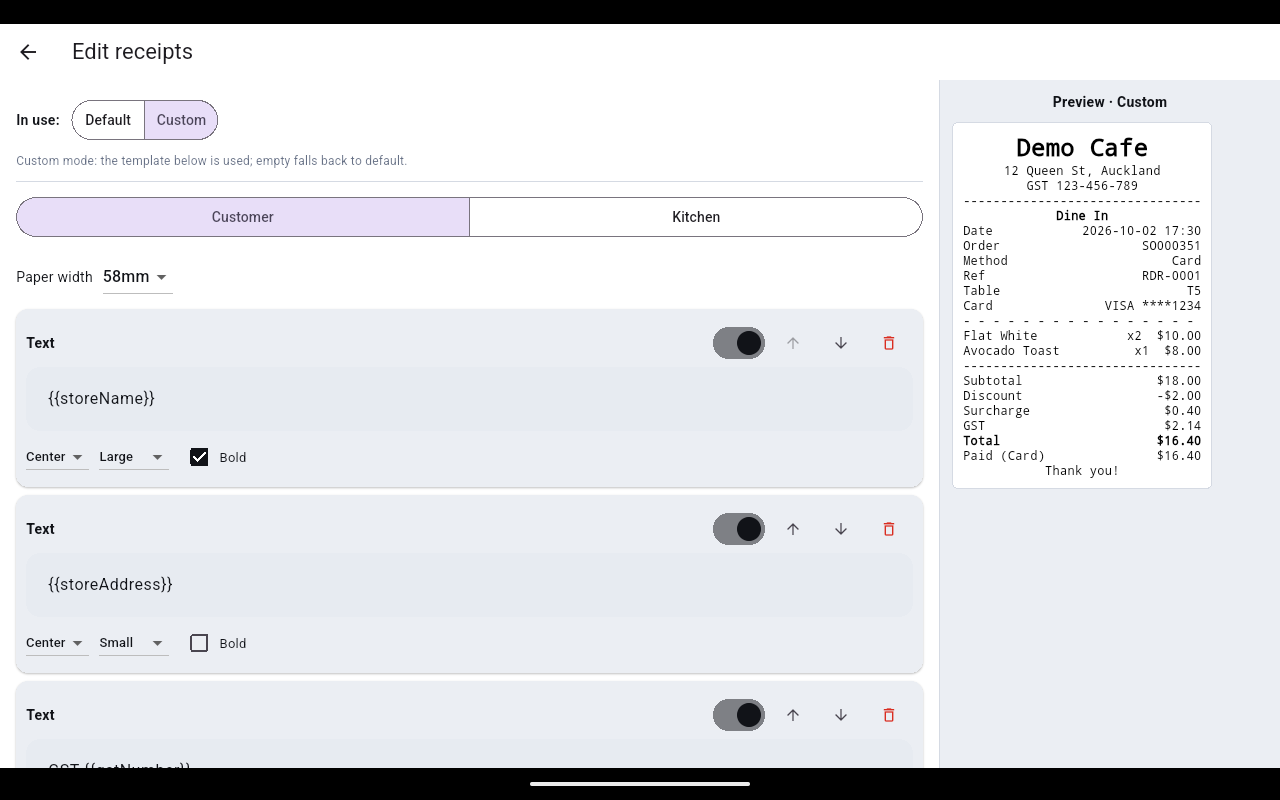
Beyond the header, you can change how the whole receipt is laid out. Tap ⋮ → General settings → Receipt layout, then Edit. There are two tabs — Customer and Kitchen — each with its own Default / Custom switch.
- Default uses the built-in layout and cannot be edited. The preview on the right shows exactly what will print.
- Custom lets you build the layout block by block. Set the Paper width (58mm or 80mm), then add text blocks with placeholders such as {{storeName}}, {{storeAddress}} and {{gstNumber}}. Each block has its own alignment, text size and Bold, plus arrows to move it up or down. The preview updates as you edit.
Reprint a receipt
- Tap the Orders icon in the top bar and select the order.
- Tap Print receipt.
When printing fails
The till never blocks a sale because of a printer. It completes the sale and then tells you in a red bar what did not print:
| Message | What to do |
|---|---|
| Sale done — no printer set for customer receipt (General settings → Printers) | The sale went through. Add a printer under ⋮ → General settings → Printers, then reprint from Orders. |
| Kitchen ticket not printed — no printer set (Preference → Receipt) | The order is saved but the kitchen has not been told. Walk the docket over, then pick a kitchen printer under ⋮ → Preference → Receipt. |
| KDS not delivered — fallback: … offline · no backup printer | The kitchen screen named in the message is not reachable and no backup printer is set. Tell the kitchen by hand. |
| No printer set (General settings → Printers) | Shown when you tap Print receipt with no printer configured on this device. |