Coupons for the online store
Merchant-wide task. A coupon is a code your customer types at the e-shop checkout. You fund it — the discount comes off before payment, so you receive less at settlement.
- Click Coupons, then New coupon.
- Enter the Code (customer types this) and, if you want one, a Title for your own reference.
- Set Applies to — All stores, or pick the branches that will honour it.
- Choose the Type, enter the Percent or amount, and cap a percentage deal with Max off.
- Set a Min spend if the coupon should only apply to larger baskets, and check that the Currency matches the stores you selected.
- Set Per-user limit (0 means unlimited) and Total limit (blank means unlimited).
- Optionally set a Start and End date. Leave both empty and the list shows the window as Always.
- Leave Enabled on On. Tick Auto-grant on login to issue the coupon once to every customer who signs in to your online store.
- Click OK. The coupon joins the table, which tracks Used / total as customers redeem it.
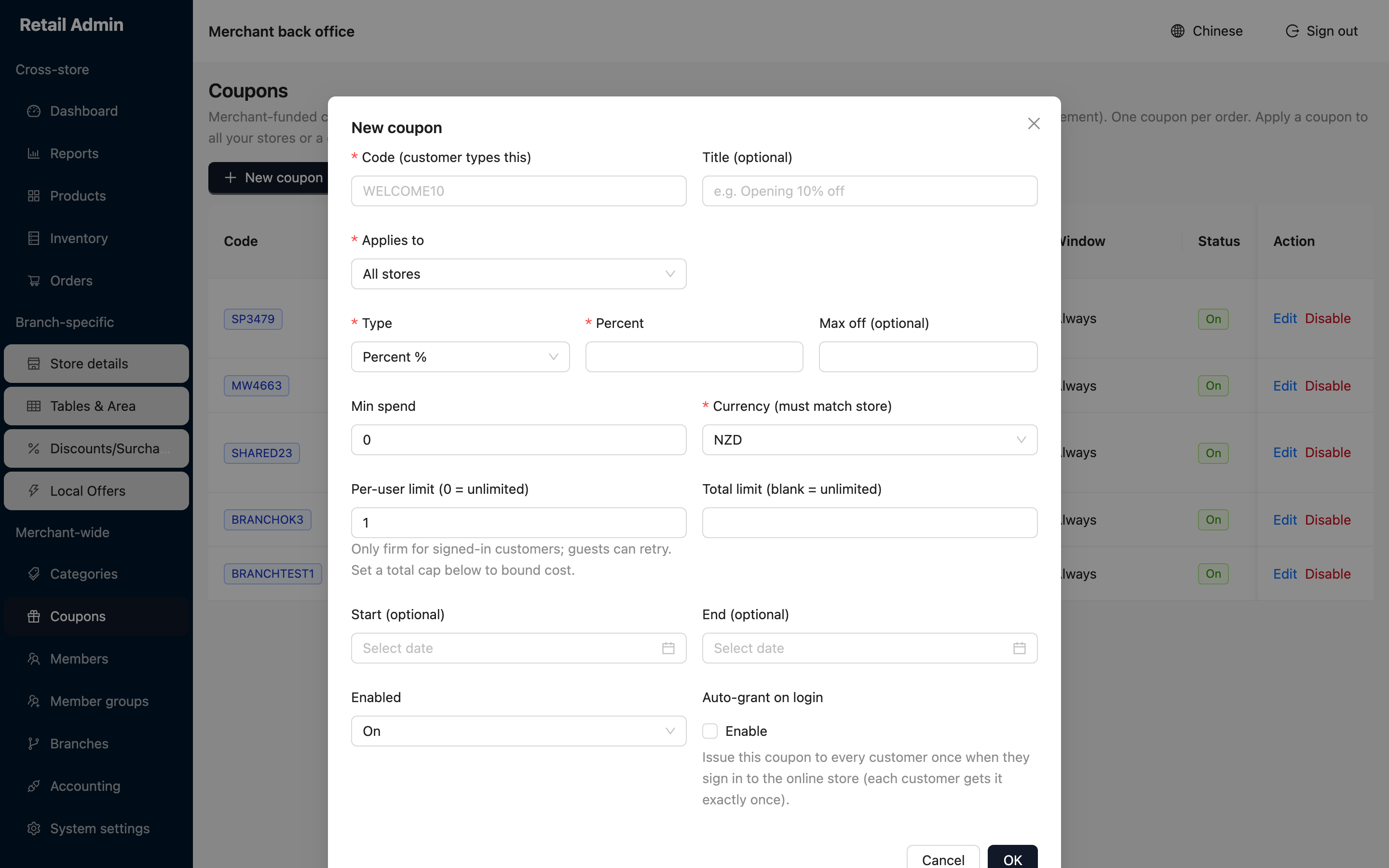
The per-user limit is only firm for signed-in customers — guests can retry. Set a Total limit as well to put a ceiling on what the campaign can cost you.