Merging pack sizes into one product
If you loaded the same drink as separate single, 6-pack and case products, this folds them into one product with units — so you count one stock and sell any size. It is a one-off clean-up you choose to run; nothing merges on its own.
When the button appears
A Merge packaging button shows on the Products toolbar only when the system spots products that look like the same item in different pack sizes — names such as Ale 440ml, Ale 6x440ml, Ale 24x440ml. If it finds nothing to merge the button is not shown at all, so most food businesses never see it.
Review and merge a group
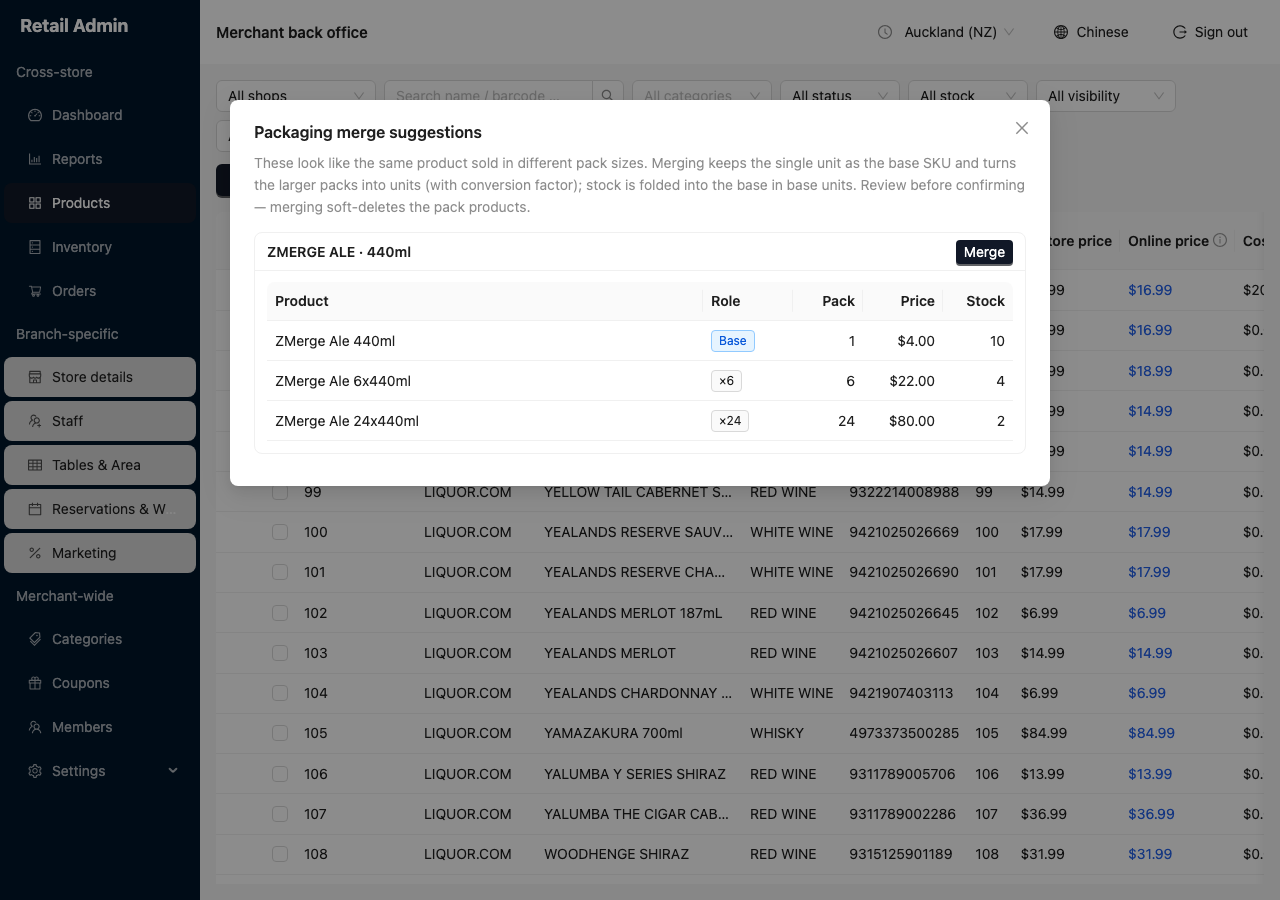
- Click Merge packaging. The Packaging merge suggestions dialog lists each group it found.
- Read the group's table. The smallest pack is tagged Base; the larger ones show the conversion factor (×6, ×24) under Role, with each product's Pack size, Price and Stock.
- If the grouping is right, click Merge on that group's card.
Merging soft-deletes the pack products and keeps only the base with its new units. Check the group is genuinely the same drink before you confirm. A product removed by mistake can be restored, but it is tidier to get the grouping right first.